About Safety Training Kiosk
Standardize Induction, Compliance & Contractor Safety-Across Sites
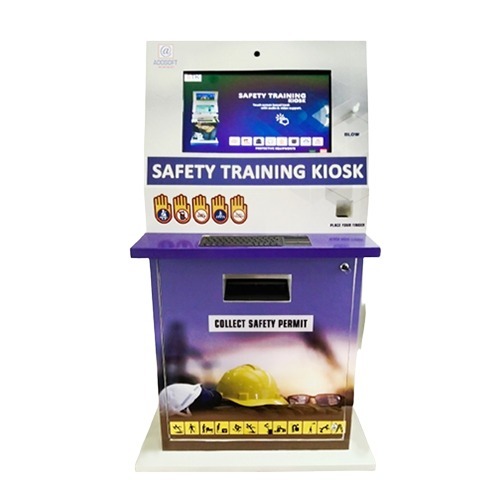
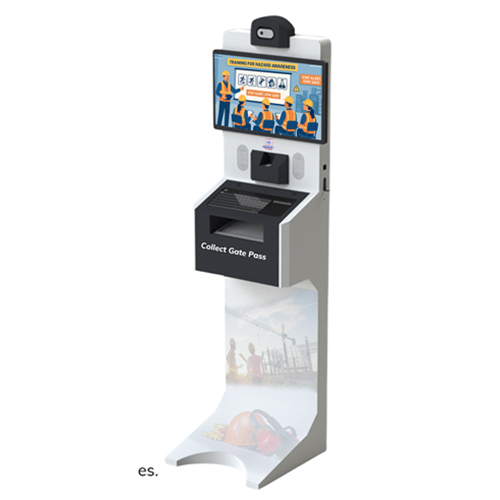
A Safety Training Kiosk is a self-contained, interactive induction and safety training platform for employees, contractors, and visitors. It delivers standardized content, captures assessment results, and generates audit-ready training records-helping organizations reduce risk and improve compliance.
Key Features & Functions:
- Al Driven Content Generation: Create and update training modules faster with Al-assisted content workflows.
- Automated PPT-to-Interactive Video Conversion: Convert PPTs into interactive learning modules with minimal manual effort.
- Multilingual Support: Multi-language support for global and multi-site deployment.
- Complimentary Mobile App: Mobile access for monitoring, reporting, and user management.
- Free Customized Printed Stationery: Branded certificates and reports (optional add-on based on project scope).
- Exclusive VVIP Safety Training Module: Visitor & Contractor Induction modes for high-security / VIP zones.
Ideal for: Oil & Gas, Construction, Logistics, Manufacturing, Airports Utilities, Pharma, Metals & Mining.
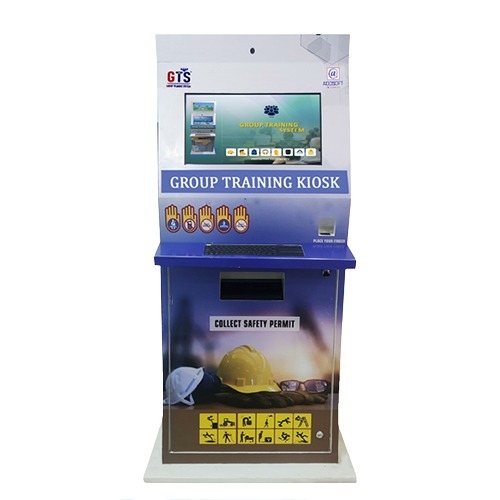
Engaging Employee Safety TrainingTransform your workplace safety induction and awareness initiatives with the kiosk's interactive touchscreen, crystal-clear audio, and multi-language support. The large display, intuitive interface, and compatibility with SCORM and multimedia content enhance learning retention and participation, making safety modules accessible and impactful for employees at any skill level.
Robust and Reliable for Any EnvironmentBuilt to withstand industrial conditions, this kiosk features an IP54 rating for dust and water resistance. The integrated fan-based cooling ensures optimal performance within 0C to 50C, while the anti-glare screen and powder-coated metallic body provide durability and clear visibility in diverse lighting. Free-standing or floor-mounted, it suits any workspace layout.
Convenient Maintenance and OperationDesigned for effortless upkeep, the kiosk offers front access for maintenance and supports external storage through HDD or USB. With remote control and timed shutdown functions, managing sessions is straightforward, and customizable options-from content to body color-allow seamless integration into existing corporate identity and safety processes.
FAQ's of Safety Traning Kiosk:
Q: How can employees access the Safety Training Kiosk?
A: Employees can log in to the kiosk using RFID cards or by entering a secure PIN, ensuring user authentication for effective tracking of training sessions and progress. Both methods are optional and customizable to match organizational needs.
Q: What types of safety training content does the kiosk support?
A: The kiosk supports SCORM-compliant modules, HTML5 interactive content, videos, and images, enabling organizations to deliver diverse and engaging training materials. This flexibility accommodates a variety of safety topics and learning preferences.
Q: Where can the kiosk be installed within a facility?
A: Thanks to its free-standing or floor-mount design and robust metal body, the kiosk can be installed in reception areas, training rooms, shop floors, or any indoor location requiring employee safety engagement, as long as it is within the recommended temperature range.
Q: What is the process for updating or adding new training modules?
A: Administrators can update content via network connectivity (Ethernet or WiFi) or by using external USB or HDD storage. The system's front access design allows for straightforward software updates and hardware maintenance.
Q: What benefit does the anti-glare screen offer during use?
A: The anti-glare screen ensures clear visibility in environments with varying lighting conditions, reducing eye strain and improving the readability and effectiveness of safety training content.
Q: When is the timed shutdown function useful?
A: The timed shutdown feature allows the kiosk to power down automatically after a set period of inactivity, conserving energy and helping maintain security outside operating hours.
Q: How does the built-in camera and multi-language support enhance user experience?
A: The built-in camera can be used for attendance tracking or interactive modules, while multi-language support enables organizations to deliver training to a diverse workforce, improving safety awareness across all employee groups.





 Send Inquiry


 Send Inquiry
 Send Inquiry
 Send SMS
 English
 Spanish
 French
 German
 Italian
 Chinese (Simplified)
 Japanese
 Korean
 Arabic
 Portuguese